Cable bills are out of control. Between sports packages, “regional fees,” and channels you never watch, it’s easy to feel like you’re paying premium money for basic entertainment. Cord cutting isn’t just a budget move anymore—it’s a smart tech upgrade.
If you still want local channels, live sports, news, and major events without a monthly bill, over-the-air (OTA) TV combined with a home network setup is the cleanest solution. No subscriptions. No contracts. Just free TV, everywhere in your house.
Let’s break it down.
Why Cord Cutting Actually Makes Sense
Cord cutting used to mean compromises. Today, it means control.
What you gain:
- Free local channels (ABC, CBS, NBC, FOX, PBS, CW)
- Live NFL, college football, MLB playoffs, Olympics, and news
- No buffering or streaming lag
- No monthly fees—ever
- Better picture quality than most cable feeds
Add streaming services only for what you actually watch, and suddenly your entertainment setup works for you—not the other way around.
The Power Move: Free Wireless TV on Every Screen
This is where cord cutting levels up.
Instead of running coax cables to every TV or sticking cheap antennas behind each screen, you can create a whole-house wireless TV system that broadcasts free over-the-air channels to every TV, phone, tablet, or computer on your network.
The Gear That Makes It Happen
Over-the-Air Antenna
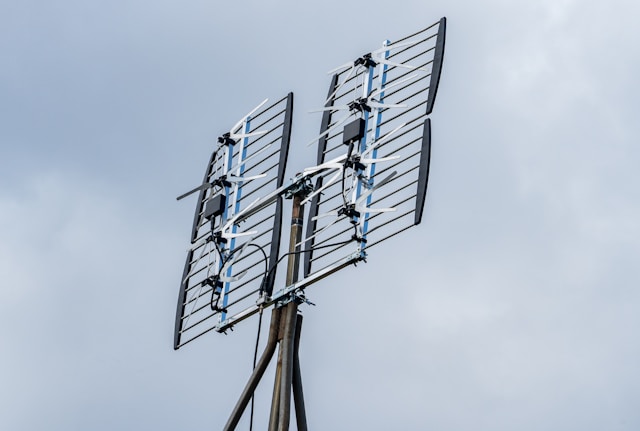
Antennas Direct ClearStream 2V Indoor/Outdoor TV Antenna
- UHF & VHF
- Multi-directional
- 60+ mile range
- 4K / 8K UHD ready
- Includes reflector and 20-inch mast
Network TV Tuner
SiliconDust HDHomeRun Flex 4K (HDFX-4K)
- ATSC 3.0 NextGen TV compatible
- 2 or 4 tuners (watch or record multiple channels at once)
- Streams live TV over your home network
This combo turns free broadcast TV into a private streaming service for your house.
How to Set Up Wireless Free TV Throughout Your Home
Step 1: Install the Antenna
Mount the ClearStream 2V:
- Outdoors, attic, or near a window for best reception
- Aim toward local broadcast towers (a quick zip-code lookup helps)
- Use the included mast and reflector for improved range and signal strength
Connect the antenna’s coax cable to the HDHomeRun Flex 4K.
Step 2: Connect the HDHomeRun to Your Network
- Plug the HDHomeRun into your router using Ethernet
- Power it on
- Run the channel scan via the HDHomeRun app or web interface
The tuner pulls in live local channels and makes them available across your home network.
Step 3: Watch TV Anywhere in the House
Install the HDHomeRun app on:
- Smart TVs
- Apple TV
- Android TV
- Fire TV
- Phones and tablets
- Computers
Every TV now gets live local channels wirelessly, no coax cable required.
Step 4 (Optional): Add DVR Capability
Pair the HDHomeRun with:
- A USB hard drive or NAS
- HDHomeRun DVR service or compatible apps
Now you can pause live TV, record games, and skip commercials—still without cable.
Why This Setup Beats Cable (Every Time)
- Zero monthly cost for local channels
- Better picture quality than compressed cable feeds
- Whole-home access without extra boxes
- Future-proof with ATSC 3.0 NextGen TV
- Works alongside Netflix, Prime, Hulu, or YouTube TV
It’s a one-time hardware investment that pays for itself fast.
The Bottom Line
Cord cutting isn’t about giving things up—it’s about upgrading how you watch TV.
With the ClearStream 2V antenna and SiliconDust HDHomeRun Flex 4K, you get:
- Free live TV
- Wireless access on every screen
- No contracts
- No nonsense
If you’re still paying a cable bill just to watch local channels and sports, it’s time to cut the cord—and do it the smart way.